Logitech MX Master 3S Review: A Focused Fit for Desk-Heavy Work
A research-based look at the MX Master 3S for right-handed professionals who value precise tracking, fast scrolling, and multi-device control.
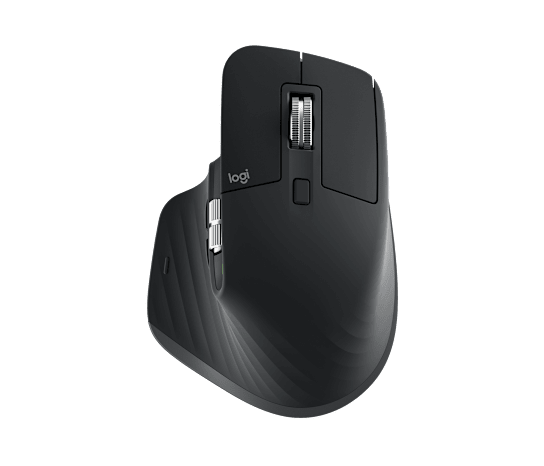
Quick Verdict
The MX Master 3S is a strong desk mouse for right-handed users who spend long hours in documents, spreadsheets, or creative software. Its shape, weight, and software dependence make it a deliberate productivity choice—not a universal fit.
Editorial assessment based on Logitech's published specifications, compatibility documentation, and feature disclosures. We did not claim hands-on testing.
Key Specifications
Source: manufacturer information, as linked in the references below. Published battery life and performance figures are manufacturer claims, not measurements by WorthTrove.
- Sensor
- Darkfield, 200–8,000 DPI
- Buttons
- 7, plus thumb wheel and gesture control
- Connections
- Bluetooth Low Energy and Logi Bolt
- Weight
- 4.97 oz (141 g)
- Handedness
- Right-handed
- Battery
- Rechargeable 500 mAh Li-Po
Pros and Cons
Strengths
- 8,000 DPI sensor supports high-resolution and multi-monitor setups
- MagSpeed wheel and thumb wheel suit long documents and horizontal timelines
- Bluetooth and Logi Bolt provide flexible connection options
- Can switch among up to three paired devices
Limitations
- Right-handed shape excludes left-handed users
- At 4.97 oz, it is heavier than travel and gaming-focused mice
- Advanced customization relies on Logi Options+ on Windows or macOS
- USB-C charging cable does not make it a wired data mouse
Who it's for
- Right-handed knowledge workers
- Spreadsheet, timeline, and document-heavy workflows
- People moving between as many as three computers
Who should skip it
- Left-handed users
- Travelers prioritizing minimal weight
- Competitive gamers seeking a lightweight high-polling design
What we considered
We considered hand preference, desk space, scrolling tasks, and whether the required customization software can run on a work computer. Extra controls help only when they remove a repeated step in your own workflow.
Price positioning depends on the current seller and package. We do not treat an unverified discount or a commission rate as evidence of value.
What stands out on paper
The MX Master 3S combines a Darkfield sensor adjustable from 200 to 8,000 DPI with an electromagnetic MagSpeed wheel, a secondary thumb wheel, and seven primary buttons. That combination is aimed at navigating large canvases and repetitive desktop workflows rather than minimizing weight.
Connection options include Bluetooth Low Energy and Logitech's Logi Bolt receiver. Basic functions extend across several operating systems, while button remapping and application profiles are centered on Logi Options+ for Windows and macOS.
The ergonomic decision
This is a full-size, 4.97-ounce mouse with a pronounced right-handed contour. A planted design can be useful at a fixed desk, but size and grip preferences are personal; buyers with smaller hands should compare dimensions or try the shape before committing.
Left-handed shoppers should skip it. The body, thumb rest, and side controls are not mirrored, and software cannot change that physical constraint.
Our bottom line
The value is concentrated in navigation and customization. If you routinely move through long spreadsheets, video timelines, design canvases, or several computers, the controls have a clear job to do.
For email, browsing, and occasional laptop use, a lighter and less specialized mouse may cover the essentials with less bulk.
Use Cases
Multi-monitor desk
Adjustable tracking up to 8,000 DPI can reduce repeated lifting across large or high-resolution displays.
Long documents
The free-spinning wheel is designed for rapid vertical movement, while the thumb wheel can support horizontal work.
Two-computer workflow
Easy-Switch supports three channels; deeper cross-computer features depend on compatible Logitech software.
Alternatives
| Option | Best for | Main tradeoff |
|---|---|---|
| Logitech MX Anywhere 3S | Travel and smaller hands | Less palm support and fewer desk-first controls |
| Logitech Lift | A vertical grip | Different control layout and lower maximum tracking resolution |
Frequently Asked Questions
Is it a left-handed mouse?
No. The MX Master 3S has a right-handed shape. A left-handed or shared workstation is a reason to consider a different design.
Will more DPI make office work better?
Not automatically. Sensor range is only one specification; grip, pointer settings, display layout, and the controls you actually use matter more for routine office work.
How we researched this product
We reviewed the public manufacturer information and documentation linked below, compared the listed capabilities with common buying needs, and identified ownership limits. This is a research-based review; we did not purchase or physically test this product. We update this page when material information changes.
Specifications describe the maker's claims. Suitability and buying advice are our editorial interpretation, not independently measured performance. We have not assigned a score or summarized customer sentiment without a documented basis.
References / Source Links
Specifications and support details can change. Check the manufacturer before purchase.